How to Hold Bitcoin Without Losing It
Self-custody doesn't remove risk. It moves it. You stop trusting an exchange to still be there next year, and you become the only thing standing between your savings and a mistake nobody can reverse. Usually that is the right trade. It only works if you take the second half of it seriously.
Written for someone who has never done this, with the parts experienced holders get wrong marked clearly.
By drix · Last reviewed 11 August 2026
The Trade You Are Making
When you buy Bitcoin on an exchange, the exchange holds it. Your balance is a row in their database and a promise to pay. Self-custody replaces that promise with a private key only you control. That is what “not your keys, not your coins” means. It is true, and it is half a sentence. Both arrangements can fail. They fail differently.
Insolvency, fraud, hacks, frozen withdrawals, account closures, and the chance that the coins backing your balance were quietly lent to someone else. None of it is hypothetical. None of it is something you can influence from the outside.
Lost or destroyed backups, phishing, malware that rewrites addresses, a passphrase you cannot remember, theft, and the chance that nobody can recover any of it after you die. No support line. No password reset. Every one of these is something you can influence, and that is the point.
Say the uncomfortable part plainly: a badly executed self-custody setup is more dangerous than a reputable exchange. Irreversibility cuts both ways. The same property that stops anyone from freezing your coins has a cost. A single mistyped word, a house fire, or one moment of trust in a fake support agent ends the story permanently. Almost everyone who loses bitcoin in self-custody loses it to themselves.
The rest of this page is about the second half of that trade. Get the habits right and self-custody becomes boring, which is what you want from money. Skip them and you have swapped a risk you understand for one you do not.
Is It Worth It For You Yet?
“Everyone should self-custody everything immediately” is dogma, not advice. A hundred dollars someone is actively trading is a different problem from savings that would change their life. The honest heuristic has nothing to do with a dollar threshold:
Ask two questions. Would losing this money materially change your life? And is this a position you are trading, or savings you intend to still hold in five years? If the answer is “yes” and “savings”, the exchange is the weak link. If it is “no” and “trading”, your effort is better spent on a hardware security key for the exchange account than on a wallet you will not maintain properly.
Small and active
Money you are trading, or an amount you could rebuild in a few months. A reputable exchange with a hardware security key (not SMS) on the account is defensible. Turn on withdrawal allowlists. Do not skip self-custody out of laziness, but do not rush a bad setup either.
Real savings
Meaningful money you intend to hold for years. One hardware wallet, a tested recovery, two durable backups in two locations. That is it. This is the case the rest of the page is written for, and it covers the large majority of holders.
Life-changing
More than you could ever earn back. A single seed in a single place is now the risk, not the exchange. This is where 2-of-3 multisig, geographically separated keys, and written inheritance instructions stop being paranoid and start being proportionate.
Whichever bracket you are in, move in stages. Withdraw an amount you would be annoyed but not devastated to lose. Live with the setup for a few weeks. Check that you can put your hands on the backup without hunting for it. Then move the rest. Nobody has ever regretted a slow migration.
Why Exchanges Are the Weak Link for Savings
The case against leaving savings on an exchange is not theoretical. Every one of these was, at the time, a reputable place that ordinary people trusted:
The largest Bitcoin exchange of its era filed for bankruptcy in Tokyo. It cited 850,000 missing bitcoin, 750,000 of them belonging to customers, worth about $450M at the time. Around 200,000 were later found in an old wallet. Creditors waited more than a decade for partial repayment.
The popular story is that the founder died holding the only keys. The Ontario Securities Commission investigated and found something worse. Gerald Cotten had been trading away client assets for years, in what staff described as a Ponzi scheme, and at least $169M of client funds were lost. Sole control of the keys made the fraud possible. It was not itself the cause.
A top-three exchange collapsed in days after customer assets were routinely held and commingled at an affiliated trading firm. The CFTC put the loss at over $8 billion in customer deposits. Balances shown in the app did not correspond to coins that existed.
A yield platform froze withdrawals and filed for bankruptcy. The FTC entered a $4.7 billion judgment, suspended so the estate could return what remained. Depositors became unsecured creditors and have since recovered a substantial fraction, over years, through the bankruptcy.
Two caveats, stated honestly. Proof-of-reserves attestations, which several exchanges now publish, show assets at a snapshot in time. They say nothing about liabilities, and they are not audits. Regulated custody in some jurisdictions is also safer than it was in 2022, which is why the answer for a trading balance is not automatically “withdraw everything today”. For savings, though, the pattern has repeated often enough that it does not need re-litigating.
How People Lose Coins
This is the section most guides skip. It is also the one that will save you money. Ordered by how often each thing happens in the real world, not by how dramatic it sounds:
Your own mistakes and lost backups
By a wide margin the biggest cause of permanent loss. Words copied down wrong. Words stored somewhere that later flooded or burned. Words thrown out during a house move, or never tested in the first place. Nobody attacked these people. Nobody can count lost coins directly either. The usual proxy is coins that have not moved in five years or more, and a June 2020 Chainalysis report put that bucket at roughly 3.7 million BTC. Read it as an upper bound that includes patient holders, not a loss count. Analysts using other rules reach very different totals, and Chainalysis has not published an update we could find.
What helps: Test your recovery before you fund the wallet. Keep two backups in two places.
Source: Decrypt, reporting the June 2020 Chainalysis dormancy estimate
Phishing and impersonation
Fake wallet apps in the app stores. Sponsored search ads pointing at cloned wallet sites. "Support agents" who appear within minutes of you posting a problem publicly. Fake airdrops and forced "migrations". Hardware wallet customer lists have leaked as well: Ledger in 2020 and again in January 2026, Trezor's support portal in 2024. That leak fed targeted letters and emails aimed at people known to hold crypto.
What helps: No legitimate wallet, support agent, exchange, or airdrop will ever need your recovery phrase. There is no exception to this rule.
Sources: Ledger CEO update, 272,000 records · BleepingComputer, Ledger / Global-e breach (Jan 2026) · BleepingComputer, Trezor support-portal breach (2024)
Address-swapping malware
Clipboard hijackers and malicious browser extensions swap the Bitcoin address you copied for the attacker's. It looks right on your screen because the same malware rewrites what your browser displays. Once the transaction is broadcast, nobody can pull it back.
What helps: Confirm every receive and send address on the hardware wallet's own screen, which the malware cannot touch.
Recovery phrase typed into a website or app
The single most efficient theft in Bitcoin. A convincing "wallet validation", "sync tool", or "claim your fork coins" page collects twelve or twenty-four words. Within seconds it empties every account derived from them, including accounts you have not created yet.
What helps: Your seed is entered on a hardware wallet, or on nothing at all.
Exchange or custodian failure
The risk this page exists to address. It's real and it has repeated, but for an individual holder it is statistically less common than the four items above. Proof-of-reserves attestations show assets at a moment in time. They do not show liabilities, and they are not audits.
What helps: Hold long-term savings in your own custody. Keep only what you are actively trading on an exchange.
Supply-chain tampering
In 2021, criminals working from the leaked Ledger customer list mailed convincing "replacement" hardware wallets, in authentic-looking packaging with an explanatory letter, to real owners. The devices had a flash implant and shipped with instructions to enter the recovery phrase into a fake Ledger Live app. Second-hand and marketplace devices can also arrive pre-seeded, so the seller already holds the keys.
What helps: Buy only direct from the manufacturer. Never use a device that arrives with a recovery phrase already printed or set. A genuine device generates its own in front of you on first use.
Source: BleepingComputer, tampered Ledger devices mailed (2021)
Physical coercion (the "$5 wrench attack")
Rare in absolute terms but rising. One public tally collects verified incidents: robberies, home invasions, kidnappings and extortion aimed at known holders. It lists dozens per year, and materially more in 2025 than in 2024. Its maintainer notes the list is not comprehensive, since many attacks are never reported. Almost every victim was identifiable as a holder beforehand.
What helps: Do not advertise holdings, online or in person. Consider a passphrase-protected wallet or multisig so no single person under duress can move everything.
Notice the shape of that list. The exotic threats (chip-level attacks, quantum computers, protocol bugs) sit at the bottom, or do not appear at all. What empties wallets is mundane: a backup nobody tested, a link that looked official, an address nobody checked on the device screen. There is now one large counterexample, and honesty requires naming it: in July 2026 a five-year-old firmware bug in Coldcard's seed generation let attackers drain wallets at scale — the reason that device no longer appears in the comparison below. Vendor bugs are real. They are also still far rarer than everything above this paragraph.
What a Seed Phrase Really Is
Almost every wallet you will encounter follows a standard called BIP-39. Your device generates a large random number, then encodes it as 12 or 24 words, each one an index into a fixed list of 2,048 words. Those words are not a password to an account. They are the number, written in a form a human can copy without error. Every private key and every address your wallet will ever produce is derived from it mathematically.
The device is a tool. The seed is the money.
A hardware wallet is a calculator with a screen and a locked drawer. Smash it, lose it, or leave it in a drawer for a decade and nothing is lost, because the seed regenerates every key it ever held. Lose the seed while the device still works and you are on a countdown to the day it stops working.
You are not locked to a vendor
Any BIP-39-compatible wallet can restore your seed: a competitor's hardware, or free software like Sparrow or Electrum. This is why “what if the company disappears” has such a boring answer. Write down the wallet type or derivation path your device shows (usually native SegWit or Taproot) so a new wallet finds the right accounts straight away.
Sources: BIP-39 specification · BIP-84 (native SegWit derivation) · BIP-341 (Taproot)
12 words or 24?
BIP-39 allows 128 to 256 bits of entropy, which is where 12 and 24 words come from. Both sit far beyond any conceivable brute-force search, so the difference is theoretical. Choose whichever you will back up accurately and store properly. That is the variable that decides how this ends.
Source: BIP-39 specification
The built-in checksum
The final word carries a checksum, the first ENT/32 bits of the SHA-256 hash of the entropy. That is why a wallet rejects a phrase with a mistyped word instead of silently opening an empty one. The spec is candid that it is short: it catches most random errors, not all of them, and it does nothing about lost words. If a restore is rejected, check your spelling against the official word list before assuming the worst.
Sources: BIP-39 specification · BIP-39 English word list
Where a seed phrase must never go
Not a photo. Not iCloud, Google Drive, or any synced folder. Not a note in a password manager. Not an email or a message to yourself. Not a text file. Not typed into any website, browser extension, or app other than a hardware wallet you are deliberately restoring. Anything connected to the internet should be treated as already read by someone else.
No legitimate wallet, exchange, support agent, giveaway, or airdrop has ever needed your recovery phrase. Anyone who asks is stealing from you, without exception.
The Three Habits That Matter Most
If you remember nothing else from this page, remember these three. They cost a few minutes each and they prevent most real-world losses.
1. Verify on the device screen, every time
This is the highest-value habit in self-custody. Malware and malicious browser extensions swap Bitcoin addresses in your clipboard and rewrite what your browser shows you, so the address on your monitor can be a lie. The hardware wallet's own screen is the one display an attacker on your computer cannot reach. That small screen is the entire reason the device exists.
When receiving, generate the address in your wallet software and confirm it on the device before you paste it anywhere. When sending, read the destination address and the amount off the device screen before you approve. Compare the first six and the last six characters, not just the first four. Address-generating malware brute-forces matching prefixes.
2. Test your recovery before you fund the wallet
Set the device up. Write the words down. Then factory-reset the device, restore it from the words you wrote, and confirm the first receive address matches exactly what it showed before. Only then send any bitcoin to it.
Almost nobody does this, and it is the whole difference between having a backup and having a hope. A backup you have never restored is an untested assumption about your handwriting, your word order, and where you put the card. Ten minutes now, or a discovery in five years that you cannot undo.
3. Back it up on something that survives your house
Paper is fine against forgetting. It is useless against fire, flood, and time. Stamped or engraved metal backup plates exist because house fires and burst pipes are more common than hackers, and they cost a fraction of what they protect.
Keep at least two copies in two separate places. Two drawers in the same house do not count. A trusted relative, a workplace safe, a bank box: all reasonable. A copy that is awkward to reach is not a problem, because you should almost never need it. Do not label it “Bitcoin”. And never split a seed across locations by cutting it in half. The halves weaken each other far more than people assume, so if you want split backups, use a scheme built for it, such as Shamir or multisig.
What a Hardware Wallet Does and Does Not Do
A hardware wallet is a small purpose-built computer that holds your keys and refuses to hand them over. When you send bitcoin, your regular computer builds an unsigned transaction, the device signs it internally, and only the signature comes back. The key itself never touches an internet-connected machine.
It does: keep keys off your computer
Even a fully compromised laptop cannot extract keys from the device. Malware can propose a malicious transaction, but it cannot sign one.
It does: give you a trusted display
The device screen shows what you are really signing. It is the defense against address-swapping malware, and it works only if you read it.
It does not: protect a leaked seed
If your recovery phrase is photographed, typed into a website, or stored in the cloud, the device is irrelevant. Whoever has the words has the coins.
It does not: stop you approving a bad transaction
Confirm a payment to an attacker's address and the device does its job perfectly. The money is gone. Hardware protects keys. Nothing protects a rushed confirmation.
One more thing worth knowing: a “secure element” is a tamper-resistant chip built to resist physical extraction of secrets. Most devices use one. Blockstream Jade deliberately does not, using an open-source alternative instead. Secure elements raise the cost of an attack on a stolen device. They do nothing about phishing, malware, or a lost backup, which is where the losses are.
Moving Coins Off an Exchange
Always send a test amount first
Withdraw a small amount, wait for it to confirm, and check it appears in your wallet. One network fee buys you a check on every category of setup error, before the rest of your money is at stake. If your exchange offers a withdrawal allowlist, add the address there once it is proven.
Fees are per byte, not per amount
Bitcoin fees are priced by transaction size in bytes, not by value. Sending $10 and sending $10,000 cost the same. So dozens of tiny withdrawals leave you with a wallet full of small pieces that are expensive to spend later. Batch the migration into a few larger withdrawals instead.
Address formats
Addresses starting bc1q are native SegWit and universally supported. bc1p is Taproot, which activated at block 709,632 in November 2021: cheaper and more private, though a small number of exchanges still cannot send to it. If a withdrawal is rejected as an invalid address, ask your wallet for a SegWit address instead. Same seed, same wallet, same money.
Confirm the address on the device
Before pasting a receive address into the exchange, display it on the hardware wallet and compare it character by character. This is the step that defeats clipboard malware. It is also the step people skip, because the address “looks fine” on screen.
Withdrawals are usually cheapest when the network is quiet, typically weekends and off-peak hours. If you are dollar-cost averaging, consolidating a month or a quarter of purchases into one withdrawal beats withdrawing after every buy. You can model how the fee drag affects results in the calculator, and the methodology page explains how fees are handled there.
The Beginner Path, Step by Step
Seven steps. Step four is the one that separates people who have a backup from people who think they do.
Decide what belongs in self-custody
Move long-term savings, not trading balance. Start with an amount you would be annoyed but not devastated to lose, and live with the setup for a few weeks before moving the rest.
Buy the device direct from the manufacturer
Never from a marketplace, a reseller, or second-hand. A genuine device arrives with no recovery phrase. It generates one in front of you on first use. Anything that turns up pre-seeded is a theft in progress.
Set it up and write the recovery phrase by hand
Set a PIN, then write the words on the supplied card in order and in your own handwriting. No photos, no cloud, no password manager, no typing them anywhere. Record the wallet type or derivation path the device shows you, if it shows one.
Wipe the device and restore from your backup
Almost everyone skips this step, and it is the whole point. Factory reset the device, restore it from the words you just wrote, and confirm the first receive address is identical. Only now do you know you have a backup rather than a hope.
Send a small test amount and verify on the device screen
Generate a receive address, confirm it character-for-character on the hardware wallet's own display, and withdraw a small amount from your exchange. Wait for it to confirm and check the balance appears.
Move the rest
Withdraw the remainder in one transaction, or a few, rather than many small ones. Bitcoin fees are charged per transaction size, not per amount, so a wallet full of tiny deposits costs more to spend later.
Secure the backup, then write down where everything is
Get the words onto something fire- and water-resistant, and keep two copies in two separate places. Then leave a sealed note for the people who would have to find all of it without you there to explain it.
Beyond the Basics: Passphrases and Multisig
Not beginner material. Both of these improve security once you understand them. Both have also destroyed real savings when adopted too early. Get a single wallet with a tested backup working first, and live with it for a while.
The passphrase (the “25th word”)
A BIP-39 passphrase is an extra secret you type in addition to your seed words. It does not unlock your wallet. In the spec it is appended to the string “mnemonic” and used as the PBKDF2 salt. So the same words derive an entirely different seed, and therefore a different wallet. Change one character and you get a different wallet again. Your seed words alone still open a valid wallet, just not the one holding your money. That is where the plausible-deniability use comes from: a small decoy balance on the seed-only wallet, the real balance behind the passphrase.
Source: BIP-39 specification
It is also the strongest defense against a stolen device. The passphrase is never stored on the device, so even a successful laboratory extraction of the seed yields the decoy.
The blunt warning: there is no wrong-passphrase error. Mistype it and you see an empty wallet, which people reliably mistake for their coins being stolen. Forget it and the money is gone. No recourse, no exceptions. This is one of the most common ways experienced holders lose funds. Back the passphrase up in writing, separately from the seed, and make sure someone you trust can find both if you cannot.
Multisig (2-of-3)
A multisig wallet needs signatures from several keys before coins can move. The common setup is 2-of-3: three separate keys exist, any two can sign. Lose one key and you lose nothing. A thief who compromises one key gets nothing. It removes the single point of failure every single-seed setup has, which makes it the standard answer once one seed in one place is the thing keeping you awake.
Sensible practice: use devices from different manufacturers so one vendor's flaw cannot take out two keys at once. Store the keys in separate locations. And consider a collaborative custody service that holds one of the three, so a professional can help your heirs.
The complexity you must not skip: a multisig wallet is not recoverable from seed phrases alone. You also need the wallet descriptor, the file listing all the extended public keys (xpubs) and the signing policy. Lose that and you can hold all three seeds and still never reconstruct the wallet. Back the descriptor up alongside every key, in every location, and rehearse a full recovery on a fresh machine before you trust it with real money. Free software such as Sparrow or Nunchuk handles this well.
If You Died Tonight, Could Anyone Recover This?
This is the most neglected topic in Bitcoin and one of the largest causes of permanent loss. The failure is not exotic. Someone dies, the family knows there was “some Bitcoin”, and nobody knows what a seed phrase is or that the metal plate in the safe is not a novelty. QuadrigaCX is the famous version of this story, though the OSC investigation found fraud underneath it, not just a dead man's keys. The version that happens quietly, to individuals, never makes the news.
“My family will figure it out” has destroyed a lot of bitcoin. They will not figure it out. They do not know what they are looking at.
Separate the “where” from the “what”
Write a plain-English document. Say that the asset exists and roughly how much. Name the wallet software to install and the device model. Say where the device and each backup physically are, and who to call for help. It should contain no seed words. This document can be far less protected than the seed itself, because on its own it opens nothing.
Never put the seed in your will
In many jurisdictions a will becomes public record during probate, and plenty of people read it long before then. Reference the existence of the asset and the location of sealed instructions: a lawyer's sealed envelope, a safe deposit box, an executor's package. Keep the secret material outside the document itself.
Multisig is the cleanest answer
Hold two keys yourself and give the third to a trusted person or a collaborative custody service. No single party can steal it, and your heirs can recover it with professional help after your death. It also removes the awkward problem of an inheritance document that is itself a theft target.
Rehearse it
Have the person who would really be doing this walk through a recovery with a trivial amount, with you in the room but not touching anything. Twenty minutes will show you what your instructions left out. An inheritance plan nobody has tested is exactly as reliable as a backup nobody has restored.
One more practical point. Tell at least one person the asset exists, because every mitigation above assumes somebody eventually goes looking. Perfect operational security that nobody survives you knowing about is indistinguishable from having burned the money.
Hardware Wallets Worth Buying
Ordered roughly from most beginner-friendly to most specialist. Every one is a reasonable choice, and the differences between them matter far less than whether you test your backup. The trade-offs are still real, so each entry carries its caveat as well as its pitch.
Prices checked August 2026 and stated as approximations; vendors discount frequently, so confirm current pricing on the manufacturer's site. Links marked (affiliate) support this project at no extra cost to you.
Removed from this list · August 2026
Coldcard. Until 11 August 2026 this page recommended Coinkite's Coldcard. On 30 July 2026 Coinkite disclosed that a firmware flaw introduced in March 2021 had weakened seed generation on its devices, and attackers spent the following week draining affected wallets — roughly $116 million by 5 August, by Galaxy Research's tally. Patched firmware exists, but it cannot repair an existing seed: anyone whose seed was generated on affected firmware must create a new wallet and move everything. We removed the recommendation while the exploit is active and Coinkite's post-mortem is pending. If you own a Coldcard, read our full write-up: what happened, which seeds are affected, and what to do now.
Sources: Coinkite, Coldcard security advisory (30 July 2026) · TRM Labs, inside the $116M Coldcard hack (5 Aug 2026) · The Hacker News, Coldcard seed flaw and thefts (Aug 2026)
Buy direct from the manufacturer, every time. Not Amazon, not eBay, not a reseller, not second-hand, however good the discount looks. Tampered devices are a documented attack: in 2021 criminals used the leaked Ledger customer list to mail convincing counterfeit “replacements” to real customers. A genuine device never arrives with a recovery phrase already written down. It generates one in front of you.
The Short Version
Approximate prices as of August 2026. Tap a name to jump to the full write-up, which carries the caveats this table is too small for.
| Wallet | Price | Open source | Secure element | Air-gapped | Best for |
|---|---|---|---|---|---|
| Trezor | from ~$79 | Yes, reproducible builds | Yes (EAL6+) | No (USB) | a first hardware wallet you can independently verify |
| Blockstream Jade | from ~$79 | Yes, hardware and firmware | No (blind-oracle PIN server) | Optional (QR on the Plus) | open-source purists and the best value in the category |
| Ledger | from ~$79 | No (proprietary device OS) | Yes (EAL5+/EAL6+) | No (USB/Bluetooth) | people who want the smoothest app and accept the closed-source trade-off |
| BitBox02 | from ~$109 | Yes, reproducible builds | Yes (dual-chip) | No (USB) | minimalists who want Bitcoin-only without the complexity tax |
| Cypherock X1 | ~$159-$199 | Source-available (Commons Clause) | Yes (EAL6+) | No (USB) | people who distrust their ability to protect a single paper backup |
| SeedSigner | ~$50 in parts | Yes, reproducible builds | No (stateless, stores nothing) | Yes (QR only) | technical users, multisig signers, and maximum verifiability |
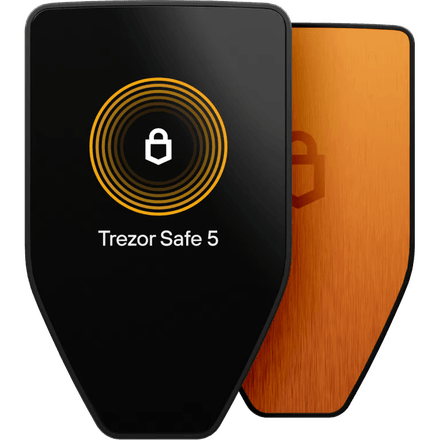
Trezor
from ~$79Open-source, and the easiest to verify
SatoshiLabs shipped the Trezor Model One in 2014, the first hardware wallet of its kind. Its firmware has always been open-source and reproducibly built, so independent researchers can confirm the code on your device matches the published source. The current Safe line adds a certified secure element, and every model can run Bitcoin-only firmware that strips the altcoin code out entirely.
Lineup and pricing: Safe 3 around $79, Safe 5 around $169, Safe 7 around $249. The older Model One and Model T are retired.
Know this too: Ledger's Donjon research team has twice demonstrated laboratory attacks on Trezor silicon. First, a voltage glitch that bypassed Safe 3 supply-chain countermeasures, disclosed March 2025. Second, a laser fault-injection attack on the Safe 7's TROPIC01 secure element, disclosed 2026, after Donjon reported it to Tropic Square in January. Both need physical possession, decapsulation or desoldering, specialist lab equipment and expertise. Trezor says the TROPIC01 flaw compromises one of three independent secrets and does not by itself expose keys or funds. Neither attack has been seen in the wild. So the practical lesson is about tampered and second-hand devices, not about a device you bought direct and set up yourself. Separately, a third-party support portal exposed names and email addresses for up to 66,000 people who had contacted Trezor support, disclosed January 2024. No postal addresses, but plenty for targeted phishing.
Sources: Trezor Model One · Trezor, Ledger Donjon Safe 3 evaluation · Trezor, TROPIC01 disclosure · BleepingComputer, Trezor support-portal breach (2024)
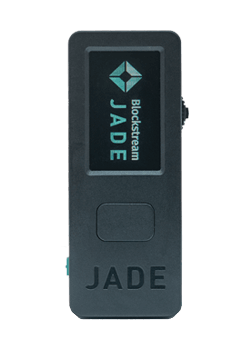
Blockstream Jade
from ~$79Bitcoin-focused, fully open, well priced
Built by Blockstream, Jade is fully open-source in both hardware and firmware. The lineup now splits into three devices: Classic and Core for a quick move off an exchange, Jade Plus for camera-based QR signing and SD-card air-gapping. All three run identical firmware and the same security model.
Lineup and pricing: Jade Classic around $79, Jade Core around $99, Jade Plus around $169 list and often on sale near $143. Stock runs out regularly, so check availability.
Know this too: Jade has no dedicated secure element chip. Instead it encrypts your key material and unlocks it through a handshake with a "blind oracle" PIN server. That server is blind to the PIN by design, and exists mainly to enforce a three-attempt limit. Blockstream runs one by default. The server is open source and Dockerized, so you can run your own. Signing still happens offline and the seed never leaves the device. But if you want zero third-party dependency in the unlock path, plan to self-host the oracle.
Sources: Blockstream Jade firmware · Blockstream blind PIN server
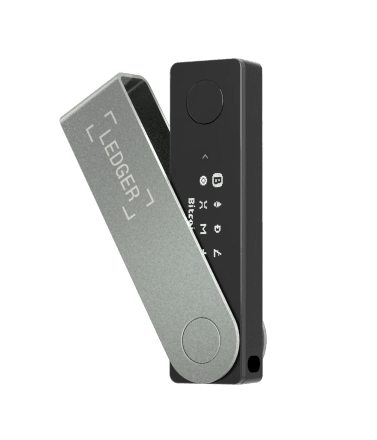
Ledger
from ~$79The most polished software, with a real trade-off
Ledger has sold more hardware wallets than anyone, and Ledger Live is the most approachable companion app in the category. Its secure element chips carry independent security certifications, and no Ledger device has ever been remotely compromised. The trade-off is transparency. The device operating system and the secure element firmware are both proprietary.
Lineup and pricing: Nano S Plus around $79, Nano X around $149, Nano Gen5 around $179, Flex around $249, Stax around $399. The original Nano S reached end of support in 2025.
Know this too: Two things to weigh honestly. First, you can't audit Ledger's device OS the way you can Trezor's, BitBox's, or Jade's. You are trusting the company's implementation. The 2023 "Ledger Recover" seed-backup service, announced and then postponed after a public backlash, showed that what the firmware is capable of can change. Second, Ledger has leaked customer contact data twice. The 2020 e-commerce breach exposed about a million email addresses, and the dump published that December contained roughly 272,000 records with postal address, name and phone number. A payment-processor breach at Global-e, disclosed in January 2026, exposed names, addresses, emails and phone numbers again. No keys, credentials or funds were exposed in either case. But those lists have driven years of targeted phishing and tampered devices mailed to real customers. If you buy one, use a delivery address you would not mind being public, and treat every unsolicited Ledger message as fraudulent.
Sources: Ledger, July 2020 breach disclosure · Ledger CEO update, 272,000 records · BleepingComputer, Ledger / Global-e breach (Jan 2026) · CoinDesk, Ledger Recover postponed (2023)
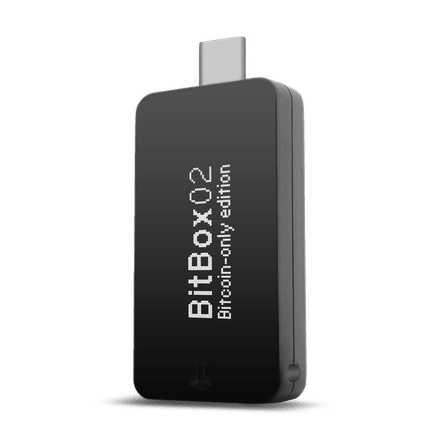
BitBox02
from ~$109Swiss-made, minimal, quietly excellent
Shift Crypto builds the BitBox02 in Switzerland. A dual-chip design pairs an ATECC608B secure element with an ATSAMD51 microcontroller, so neither one alone can release your keys. The Bitcoin-only edition strips out every other coin and costs the same as the multi edition. The newer Nova adds a glass display plus native iPhone and iPad support.
Lineup and pricing: The BitBox02 Nova, around €175, is the current flagship; the original BitBox02, around $109, is still sold. Bitcoin-only and multi editions are the same price.
Know this too: The microSD backup is convenient. It is also a full copy of your seed sitting on a small piece of plastic that degrades and is easy to misplace. Treat it exactly as you would treat written words, and keep a durable written or metal copy too.
Source: BitBox02 firmware (dual-chip design)
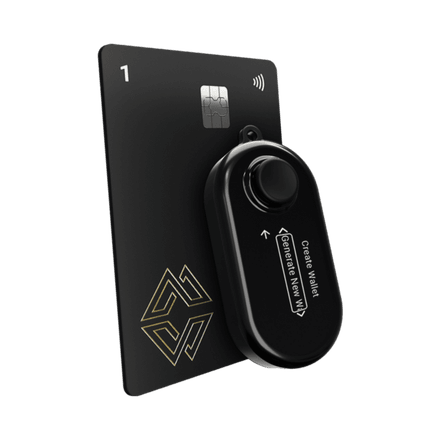
Cypherock X1
~$159-$199Nothing to write down, five things to protect
Cypherock takes a different approach. Instead of one seed phrase on paper, it splits your key material into five shares using Shamir Secret Sharing. One share sits inside the X1 Vault, and one on each of four NFC cards. Any two shares reconstruct the wallet, so you can lose up to three components and still recover.
Lineup and pricing: Usually around $199 list, frequently discounted to about $159. Replacement cards and cases are sold separately.
Know this too: The threshold cuts both ways. Any two of the five shares reconstruct your keys, so two cards found together are as good as the whole wallet to a thief. That means the cards have to be geographically separated, which is more work than most people expect from a "no seed phrase" product. The scheme is also newer and less battle-tested than a plain BIP-39 backup. The firmware ships under an MIT grant with a Commons Clause attached, which withholds the right to sell the software, so it is source-available rather than open-source in the strict sense. The mitigating factor: you can export a standard BIP-39 phrase at any time and walk away to another vendor.
Source: Cypherock X1 firmware
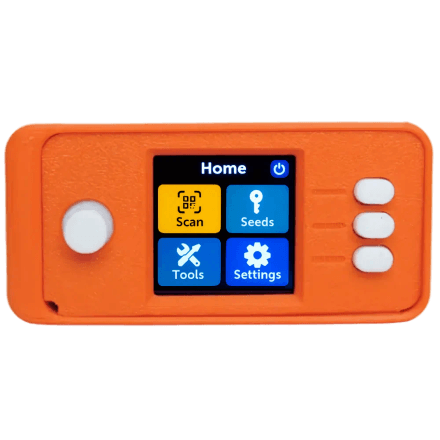
SeedSigner
~$50 in partsDIY, stateless, and holds nothing
SeedSigner is a community project rather than a product. You assemble it yourself from a Raspberry Pi Zero, a camera, and a small screen, then flash software you can verify byte-for-byte against the published source. It is stateless, meaning it stores no keys at all. You enter your seed words each time you sign and the device forgets them the moment it powers off. There is nothing on it to steal.
Lineup and pricing: A DIY build. Parts costs move with Raspberry Pi availability; pre-assembled units from third parties exist but reintroduce supply-chain risk.
Know this too: No company, no support line, no warranty, nobody to blame. Statelessness also means your seed backup comes out and gets used every time you sign, rather than staying sealed in a safe. In a home with other people in it, that is a real trade-off. Excellent as a multisig signer or a second device. A demanding choice as your only one.
Source: SeedSigner project
Affiliate disclosure: the Trezor, Blockstream Jade, Ledger, BitBox02, and Cypherock links are affiliate links. We may earn a commission at no extra cost to you, and it helps keep this calculator free. The SeedSigner link is not an affiliate link. Affiliate status did not decide what appears here or what is said about it — the Coldcard, removed above, was never an affiliate link either. Note that the caveats above are attached to the affiliate products too.
Common Questions
What if I lose my hardware wallet?
Nothing is stored on the device. Your coins live on the blockchain, and the device only holds the keys that authorize moving them. Buy a new wallet from any manufacturer, restore your recovery phrase, and your balance reappears. As long as it had a PIN and you still have your backup, the lost device is a brick to whoever finds it.
Sources: BIP-39 specification · BIP-32 (hierarchical deterministic wallets)
What if the company that made my wallet goes out of business?
Your recovery phrase follows BIP-39, an open standard implemented by every major wallet. You can restore it on a competitor's device or in free desktop software such as Sparrow or Electrum. You are never locked to a vendor. The one thing worth noting is the derivation path, defined by BIP-32 and the standards built on it. If a wallet does not auto-detect your accounts, you may need to tell it whether the original was native SegWit, Taproot, or legacy. That is why it is worth writing down.
Sources: BIP-39 specification · BIP-32 (hierarchical deterministic wallets) · BIP-84 (native SegWit derivation)
What if my device breaks or stops turning on?
Same answer, and this is exactly why step four is to test your recovery before you fund anything. A dead device is an inconvenience that costs the price of a replacement. A dead device plus an untested backup is a permanent loss. The device is a replaceable tool. The seed is the money.
If someone finds my hardware wallet, can they take my Bitcoin?
Not from the PIN screen. Devices wipe themselves after a small number of wrong attempts. Laboratory attacks against stolen devices have been demonstrated, by Ledger's Donjon team against the Trezor Safe 3 microcontroller and the Safe 7's TROPIC01 chip. But those attacks need physical possession, decapsulation or desoldering, specialist equipment and expertise, and vendors dispute how far each one actually gets. If theft of the device is what worries you, a BIP-39 passphrase defeats every one of them, because the passphrase is not stored on the device at all.
Sources: Trezor, Ledger Donjon Safe 3 evaluation · Trezor, TROPIC01 disclosure · BIP-39 specification
Do I need a passphrase?
Most people should not start with one. A BIP-39 passphrase is mixed into the seed derivation itself, so it creates an entirely separate wallet from the same words. That is powerful for plausible deniability and for defending a stolen device. But forgetting or mistyping it is unrecoverable, and there is no error message to warn you, because every passphrase produces a valid wallet. It is one of the more common ways experienced holders lose funds. Add one only once your basic backup discipline is solid, and back the passphrase up separately from the seed.
Source: BIP-39 specification
Is a phone wallet good enough?
For spending money and small balances, a reputable mobile wallet is a reasonable choice, and far better than an exchange. The limitation is that your phone is internet-connected and runs code you never audited, so a compromised phone can show you one address while signing another. A hardware wallet exists to give you a screen the phone cannot lie to. Rough guide: phone wallet for what you would carry as cash, hardware wallet for savings.
Is self-custody worth it for small amounts?
Not always, and pretending otherwise does beginners no favors. If you hold a few hundred dollars you are actively trading, a reputable exchange with a hardware security key on the account is a defensible choice. A badly executed self-custody setup loses money more reliably than a well-run exchange does. But the moment the balance becomes savings rather than a trading position, or crosses the point where losing it would hurt, self-custody is worth the effort. Devices on this page run from roughly $50 for a DIY build or about $79 for an entry-level Trezor, Jade, or Ledger, up to $250-$400 for the high-end models.
What happens to my Bitcoin if I die?
Whatever you arranged in advance. For most holders that is nothing, and it is how bitcoin quietly disappears. Your heirs need to know the asset exists, where the device and backups are, and how to use them. None of that can go into a document that becomes public record during probate. Practical options: sealed instructions held by a lawyer, or splitting the information so no single document is enough. Another is a 2-of-3 multisig where a trusted party or a collaborative custody service holds one key.
Should I buy a discounted or second-hand hardware wallet?
No. Buy direct from the manufacturer, every time. Second-hand and marketplace devices can arrive already initialized with a seed the seller kept. And in 2021, criminals mailed convincing tampered "replacement" devices, complete with an explanatory letter, to real customers whose addresses leaked in the Ledger breach. A genuine device never arrives with a recovery phrase already written down. The discount is not worth the question mark.
Source: BleepingComputer, tampered Ledger devices mailed (2021)
Can I be forced to hand over my Bitcoin?
Physically, yes. One public tally of verified physical attacks on holders lists dozens per year, and materially more in 2025 than in 2024. Most were aimed at people who were publicly identifiable as holding crypto. Its maintainer says the list is incomplete. The primary defense is not technical: do not discuss your holdings, online or in person. Beyond that, a passphrase wallet lets you surrender a decoy balance, and multisig with keys in separate locations means no one person in the room can move the funds.
Do the Boring Version Properly
One device bought direct. One recovery you have tested. Two backups in two places, and every address checked on the device screen. That covers almost every way this goes wrong.
New to all of this? Start with where Bitcoin's value comes from, or read the methodology behind the calculator.
Sources
Standards claims are cited to the BIP itself. Incidents are cited to the regulator, the affected company's own disclosure, or the security reporting, not to a summary of a summary. Product claims are cited to the vendor's published source code where one exists, which is also the point of preferring wallets that publish it. Where a number could not be traced, it was softened or removed.
- •BIP-39 specification
- •BIP-39 English word list
- •BIP-32 (hierarchical deterministic wallets)
- •BIP-84 (native SegWit derivation)
- •BIP-341 (Taproot)
- •TechCrunch, Mt. Gox bankruptcy filing (2014)
- •Ontario Securities Commission, QuadrigaCX review
- •CFTC press release 8638-22 (FTX/Alameda)
- •FTC, Celsius Network settlement (2023)
- •Decrypt, reporting the June 2020 Chainalysis dormancy estimate
- •Lopp, known physical bitcoin attacks
- •BleepingComputer, tampered Ledger devices mailed (2021)
- •Ledger, July 2020 breach disclosure
- •Ledger CEO update, 272,000 records
- •BleepingComputer, Ledger / Global-e breach (Jan 2026)
- •CoinDesk, Ledger Recover postponed (2023)
- •Trezor, Ledger Donjon Safe 3 evaluation
- •Trezor, TROPIC01 disclosure
- •BleepingComputer, Trezor support-portal breach (2024)
- •Trezor Model One
- •Blockstream Jade firmware
- •Blockstream blind PIN server
- •BitBox02 firmware (dual-chip design)
- •Coinkite, Coldcard security advisory (30 July 2026)
- •The Hacker News, Coldcard seed flaw and thefts (Aug 2026)
- •TRM Labs, inside the $116M Coldcard hack (5 Aug 2026)
- •SeedSigner project
- •Cypherock X1 firmware
Last reviewed: 11 August 2026. Prices, product lineups and vulnerability disclosures change faster than this page does. Check the manufacturer's own site before buying, and their security advisory page before assuming a device is unaffected by anything above.
Disclaimer: This page is educational and is not financial, legal, or security advice. Some links are affiliate links (Trezor, Blockstream Jade, Ledger, BitBox02, Cypherock); if you buy through them we may earn a commission at no additional cost to you. Prices, product lineups, and security disclosures change, so verify current details with the manufacturer before purchasing. Inheritance and estate arrangements vary by jurisdiction; consult a qualified professional. This site may also display ads; see /about for full disclosure.